Build Your First RAG Pipeline with LangChain
You already know what RAG is — now let’s actually build one.

In the last article, we talked about what RAG is and why we use it.
Now let’s actually build one.
This article assumes you already understand basic RAG concepts from the previous post.
🦜What is LangChain ?
LangChain is an open-source framework that abstracts away most of the boilerplate required to build LLM applications.
🦜 How to Use LangChain?
LangChain is basically a toolbox.
Go to Langchain docs (available separately for both python and js)
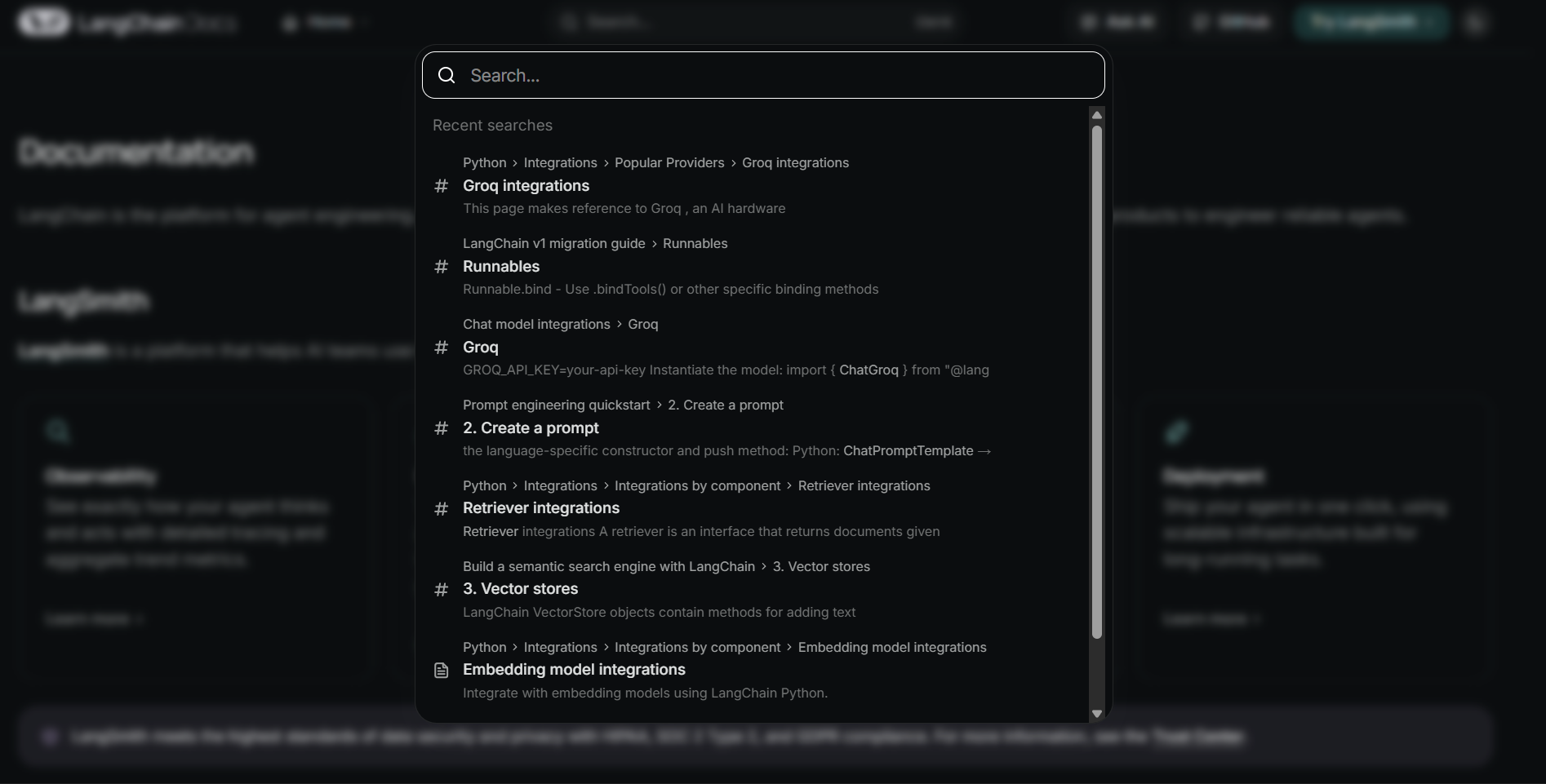
Need a loader? Search “ PDF loader”. Need embeddings? Search “embeddings”and you will see different embedding models. Need a retriever? Search “retriever”.Need to integrate LLM model ? Search "chat models".
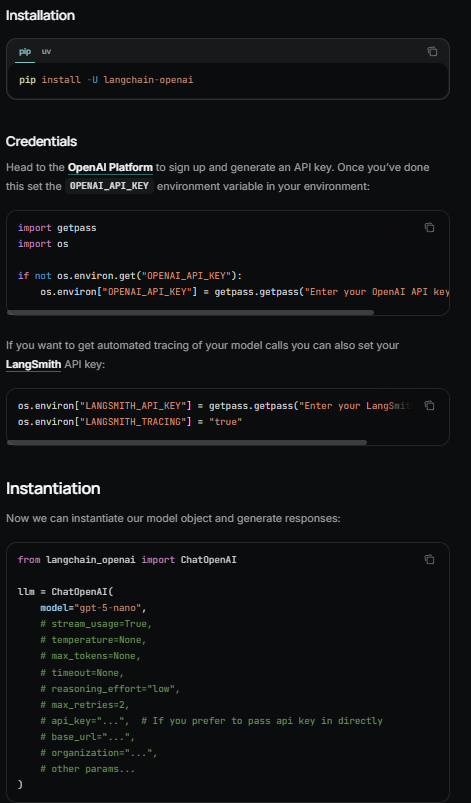
You will see dependencies and detailed docs on how to use ?
Most of the time, building with LangChain is about knowing what abstraction you need — then plugging it into your pipeline.
⚙️ RAG Pipeline Overview
So the Flow of our RAG pipeline as discussed in previous article is
loader → chunking → embeddings → vector store → retriever → generation
How to find this abstraction on langchain ?
search whatever you need , install dependencies , read docs
1️⃣ Loader
Here we are building a PDF rag , so we take a pdf loader from langchain
search pdf loader and you will see pypdf
install the dependencies and copy paste the loader
# loader
# pdf loader
from langchain_community.document_loaders import PyPDFLoader

file_path = "./Rich Dad, Poor Dad.pdf"
loader = PyPDFLoader(file_path)

docs = loader.load()
Once the loader is set up, we move to chunking.
2️⃣ Chunking
Why do we need chunking?
Instead of searching through an entire PDF at once, it’s much easier (and more efficient) to search smaller pieces of text. For simplicity, we’ll treat each chunk like a small section or page of the document.
Chunking itself is more of an art than a strict rule. There isn’t one perfect way to split text — the best strategy usually depends on your data and what works well during retrieval.
For this example, we’ll use LangChain’s RecursiveCharacterTextSplitter, which splits documents intelligently based on the structure of the text while trying to preserve context.
Let’s set up a recursive text splitter and create chunks from our loaded PDF.
# text splitters
from langchain_text_splitters import RecursiveCharacterTextSplitter

text_splitter = RecursiveCharacterTextSplitter(chunk_size=1000, chunk_overlap=200)
chunks = text_splitter.split_documents(docs)
We also need to pass a few important parameters to the text splitter.
chunk_size decides how long each chunk should be. In this example, we’re creating chunks of around 1000 characters.
chunk_overlap helps preserve context between chunks.
Why overlap?
If we split a document into strict 1000-character pieces, there’s a high chance that a paragraph or sentence gets cut in the middle. When that happens, the meaning can be lost and retrieval becomes weaker.
Chunk overlap solves this by repeating a small portion of text between consecutive chunks. This way, even if a paragraph is split, the model still receives enough surrounding context during retrieval.
3️⃣ Embeddings
Now , we have small small chunks of the document . Now for our llm to find relevant chunks. We need to create vector embeddings of this chunk and store in a vector store for semantic search.
To create vector embeddings, we need a embedding model , now there are lot of embedding models
you can use any one you like ( im using huggingface sentence transformer here )
# embeddings(huggingface)
from langchain_huggingface.embeddings import HuggingFaceEmbeddings
embedder = HuggingFaceEmbeddings(model_name="sentence-transformers/all-mpnet-base-v2")
embeddings done
4️⃣ Vector Store
Now that our document chunks have been converted into embeddings, we need a place to store them so they can be searched later. This is where a vector store comes in.
You can use any vector database you like — Chroma, Pinecone, Weaviate, or Qdrant.
For this example, I’m using Qdrant because it’s lightweight and provides a nice local UI where you can inspect your vectors.
Let’s create a Qdrant vector store and store our embedded chunks.
# create vector store(qdrant)
from langchain_qdrant import QdrantVectorStore

vector_store = QdrantVectorStore.from_documents(
    documents=split_docs,
    collection_name="embedded_chunks",
    url="http://localhost:6333",
    embedding = embedder,
)
Here, we pass our split documents along with the embedding model.
LangChain automatically converts each chunk into vectors and stores them inside the Qdrant collection.
5️⃣ Retriever
Now that our embeddings are stored in a vector database, we need a way to search them.
This is where a retriever comes in.
A retriever performs semantic search over the vector store and returns the most relevant chunks based on the user’s query.
# Retrieval
# retriever
retriever = vector_store.as_retriever(
    search_type="mmr", search_kwargs={"k": 5, "fetch_k": 10}
)
What do these parameters mean?
k → The number of final chunks we want to retrieve.
In this example, we return the top 5 most relevant pieces of context.search_type="mmr" → MMR stands for Maximal Marginal Relevance.
Instead of returning very similar chunks that may repeat the same information, MMR tries to balance relevance and diversity.
This helps avoid redundant context and gives the LLM a broader understanding of the query.fetch_k → The retriever first fetches more candidates (10 here), then selects the best 5 using MMR.
Think of it as “shortlisting” before choosing the final results.In LangChain, a retriever is also a Runnable — meaning it can be connected directly into chains and pipelines.
We’ll talk more about Runnables when we define our full RAG chain.
6️⃣ Generation
Now comes the final step — generating answers using the retrieved context.
We’ll use a local LLM through Ollama and define a prompt template that tells the model how to behave.
Load the LLM model
# ollama
from langchain_ollama.llms import OllamaLLM

llm = OllamaLLM(model="llama3.1", num_predict=200)

# format docs for joinining pdfs
def format_docs(docs):
    return "\n\n".join(doc.page_content for doc in docs)
Before sending retrieved documents to the LLM, we need to convert them into a single text block.
The retriever returns a list of Document objects, but the prompt expects plain text.
So we create a helper function that extracts the content from each document and joins them together into one formatted context string.
# format docs for joining retrieved chunks into a single context
def format_docs(docs):
    return "\n\n".join(doc.page_content for doc in docs)
now we have our rag ready .
pdf loaded ✔️
embeddings done ✔️
stored to vector store ✔️
retriever ready ✔️
model loaded ✔️
Now we just have to call these functions and give query
But first define a prompt
Prompt Templates
Prompt templates help keep our instructions consistent when interacting with the LLM.
Instead of hardcoding prompts every time, we define a reusable structure where variables like {context} and {question} are dynamically inserted. This makes the pipeline cleaner and easier to maintain.
Here, we create a prompt template that tells the model to answer only using the retrieved context — helping reduce hallucinations and keep responses grounded.
from langchain_core.prompts import ChatPromptTemplate

template = """You are a helpful assistant that helps people find information from the provided context.
Use the context to answer the question at the end.
context:
{context}
Question: {question}
Answer only based on the context above. If the context does not contain the answer, say "I don't know".
"""

prompt = ChatPromptTemplate.from_template(template)
Whenever the chain runs, LangChain automatically fills in the {context} and {question} fields before sending the prompt to the LLM.
Now you just have to ask user for query , retrieve relevant chunks from vector store, and call llm and boom.
Lets think it this way , you have made all the arrangements , now you just need to manually execute things sequentially.
you need to manually call these functions , store their output to variables , give it to other function , store its response and on and on .
Or There’s a cooler way.
🔗 Introducing Chains
yes the chains in the langchain
you can define a chain with the sequence and it will do all your work - take inputs, calls functions , store output ,call other functions.
Cool , Isn’t it?
But chains work only with Runnables.
What are Runnables?
In LangChain, most components (retrievers, prompts, LLMs) are Runnables.
A Runnable is anything that takes an input and produces an output. Because everything follows the same interface, we can connect them together using the | operator.
Defining the chain using LCEL
LCEL (LangChain Expression Language)
The syntax used to define chains is part of LCEL, the LangChain Expression Language.
Instead of writing long procedural code, LCEL lets you compose pipelines declaratively — almost like building a flow diagram using code.
from langchain_core.output_parsers import StrOutputParser
from langchain_core.runnables import RunnablePassthrough

rag_chain = (
    {"context": retriever | format_docs, "question": RunnablePassthrough()}
    | prompt
    | llm
    | StrOutputParser()
)
Here’s what’s happening:
The retriever searches for relevant chunks.
format_docsprepares the context text.The prompt template structures the input.
The LLM generates an answer.
StrOutputParser() converts the result into plain text.
Invoking the Chain
Runnable chains can be executed using the invoke() method.
Let’s take user input and run our full RAG pipeline.
while True:
    query = input("> Enter your question (or 'exit' to quit): ")
    if query.lower() in ["exit", "quit"]:
        break
    result = rag_chain.invoke(query)
    print(">", result)
And that’s it — our RAG pipeline now retrieves context, sends it to the LLM, and generates grounded answers automatically.
👉 Full source code: GitHub – rag.py
